
THe ACtive EDge
Edition 5 | November 2026
July 2026 Freedom Offer
Celebrating America’s 250th & Active DataComm’s 25th year: we are offering FREEdom from onboarding fees. New clients who switch from their current IT provider to an Active DataComm ITDaaS plan will receive FREE onboarding during July 2026.
IT Department as a Service (ITDaaS)
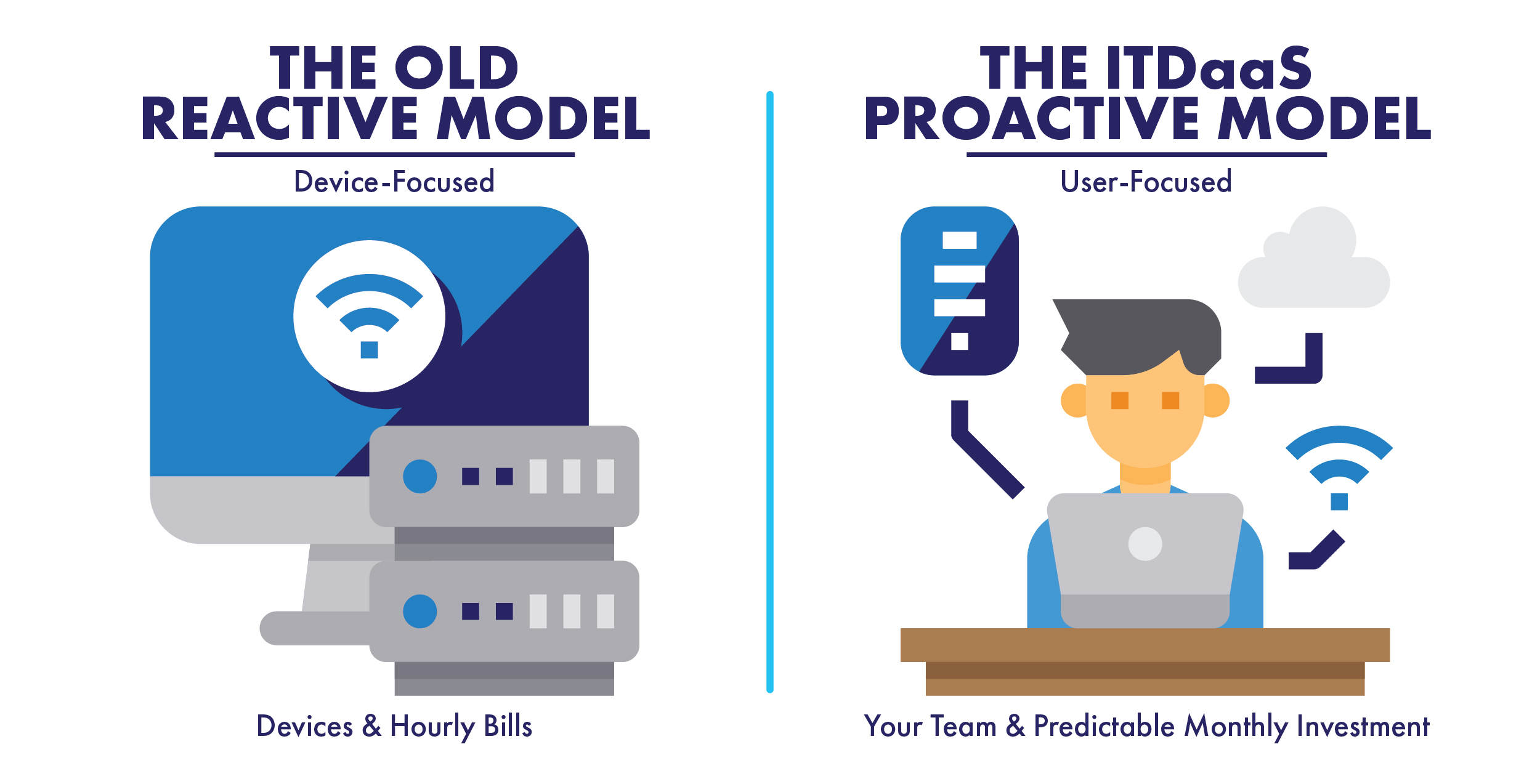
ITDaaS — IT Department as a Service
If you are tired of unpredictable tech expenses and spending more time troubleshooting network issues than serving your customers, it is time to rethink how you handle your technology. At Active DataComm, we believe enterprise-grade technology support shouldn’t require an enterprise-sized budget. That is why we are thrilled to highlight our IT Department as a Service (ITDaaS), starting at just $99 a month per user.
Instead of a one-size-fits-all approach, we offer scalable IT tiers built for your growth. We provide transparent support packages tailored to your business risk profile and compliance demands.
Whether you are a startup or a highly regulated firm, you can choose the exact level of protection and support you need:
EssentialCare: Recommended for small and low-risk businesses needing core maintenance. This foundational tier includes Priority Remote & Help Desk Support (Mon–Fri, 8–5), Remote Monitoring & Automated Patching, and Advanced Virus & Malware Protection.
ProSecure (Most Popular): Recommended for growing businesses needing active threat prevention. It includes everything in EssentialCare, plus Asset Inventory & Health Reporting, Ongoing Security Awareness Training, and Identity Threat Detection & Response (ITDR).
SecureElite: Recommended for regulated and high-risk firms in healthcare, legal, or finance. This premier tier adds robust compliance tools like SIEM Log Retention & Active Alerting, Dedicated Incident Response Coordination, and Quarterly Security Reviews by a CISSP.
Ready to secure your network and empower your team for as little as $99 a month? Reach out to our team today to find out which tier is the perfect fit for your operation.
25 Years of Keeping North Mississippi Connected—and We’re Just Getting Started
November always brings a natural moment to pause and reflect on gratitude. As we enter the final two months of our milestone 25th anniversary year at Active DataComm, I find myself looking back with immense pride—and looking forward with even greater excitement.
A quarter-century in the tech industry is a lifetime. Think back to when we first opened our doors: dial-up tones filled office hallways, floppy disks and bulky beige monitors were standard issue, and “the cloud” was just something that brought afternoon rain over Lee County. Over the past 25 years, technology has evolved beyond recognition. But through every server upgrade, broadband expansion, and digital shift, one constant has never changed: our unwavering commitment to protecting and empowering the businesses that make North Mississippi thrive.
Longevity in IT isn’t an accident. You don’t reach 25 years in this business without earning your community’s trust day in and day out. We’ve stayed in your corner through economic booms, unforeseen storms, and the modern wave of digital transformation because we treat your uptime, your security, and your team like our own.
As we celebrate 25 years of local partnerships, we want to make world-class IT more accessible than ever for our neighbors. That is why we’re closing out our anniversary year by offering enterprise-grade managed support starting at just $99 per employee:
Unlimited Business-Hours Help Desk Support: Dedicated, local experts ready to resolve issues instantly so your team never misses a beat.
Proactive Patching & Maintenance: Behind-the-scenes system care that stops technical headaches before they disrupt your day.
Endpoint Detection & Response (EDR): 24/7 next-generation threat defense guarding every workstation.
Advanced Email Filtering: Enterprise-level shielding against phishing, ransomware, and malicious spoofing.
Whether you’ve been with us since the early days or are looking for an IT partner who will treat you like family, we’re here to help you finish this year strong and enter the next quarter-century ahead of the curve.
Let’s celebrate 25 years of local partnership together.
Click here to schedule a quick 15-minute call with me and see how seamless, secure, and affordable your IT can truly be before the new year arrives!
The Takeaway
Active DataComm is celebrating 25 years of local IT service in North Mississippi by offering an accessible, enterprise-grade managed support package.
The new tier starts at $99 per employee and covers essential security and operational needs, including unlimited business-hours help desk support, proactive maintenance, 24/7 endpoint detection and response (EDR), and advanced email filtering.
The Action Item
Schedule a 15-minute call to discuss securing the $99/employee IT support package before the end of the year.

Cybersecurity Isn’t Just an IT Problem
October is Cybersecurity Awareness Month, making it a good time to remember that protecting a business from cyber threats takes more than installing security software.
Today’s attacks increasingly target people as much as technology. A convincing email may appear to come from a coworker or vendor. A fake Microsoft 365 login page can look nearly identical to the real thing. An unexpected MFA request may seem harmless. And with artificial intelligence, criminals can create increasingly convincing messages, images, and even voices.
That’s why effective cybersecurity requires layers of protection.
Technology such as endpoint protection, email security, multi-factor authentication, identity monitoring, security updates, backups, and network monitoring can provide strong defenses. But technology works best when it’s combined with good processes and employees who know how to recognize something unusual and what to do when they see it.
The goal isn’t to make employees afraid to open an email or answer the phone. It’s to create an environment where one mistake doesn’t have the opportunity to become a major business disruption.
Cybersecurity is no longer something that belongs only to the IT department. It’s part of protecting your customers, your employees, your reputation, and ultimately, your business.
— Chris Elkins
VP of Technology
Active DataComm
The Takeaway
Your employees are an important layer of your cybersecurity defense. Give them the knowledge and tools to recognize a threat before they become a victim.
The Action Item
Ask Active DataComm about in-person staff security training or ongoing email-based Security Awareness Training for your team.

One of the more useful ways I’ve used ChatGPT is for studying. While working through IT certification material, I can have it quiz me on hardware, networking, and Windows instead of just reading the same notes over and over.
If I get a question wrong, I can ask why, have it explain the other choices, or give me a similar question to see if I actually understood it. I can also tell it to focus on topics I’m struggling with and increase the difficulty.
Of course, AI can get things wrong too, so I still check questionable answers against reliable study material. But it’s a pretty handy study partner, especially when I need more practice.
Result: the robot assigned me homework.
The Takeaway
ChatGPT serves as a highly customizable and interactive study partner that can generate practice quizzes, explain incorrect answers, and adjust difficulty based on your weak areas.
Because AI can sometimes provide incorrect information, it is essential to always verify its answers against reliable, official study materials.
The Action Item
Prompt ChatGPT (or your preferred AI tool) to generate a practice quiz on a subject you are currently studying, but make sure to keep your textbook or official notes handy to fact-check the results.
Windows Virtual Desktops
Most employees juggle multiple active projects, often leading to cluttered taskbars and diminished focus. Windows 10 and 11 offer a built-in organizational solution: Virtual Desktops. By pressing [Windows Key] + [Ctrl] + [D], you instantly create a new, clean workspace. This allows you to separate distinct workflows—such as communications in one area, and active design or research tasks in another. Switch between your open desktops seamlessly using [Windows Key] + [Ctrl] + [Left/Right Arrow].
Use this feature to isolate focused tasks without needing to close open windows. Remember to close unused desktops with [Windows Key] + [Ctrl] + [F4] to maintain system performance.
The Takeaway
Windows Virtual Desktops provide a built-in way to reduce screen clutter and improve focus by separating different projects or workflows into distinct, clean workspaces.
The feature relies on quick keyboard shortcuts, allowing you to instantly create ([Windows Key] + [Ctrl] + [D]), switch between ([Windows Key] + [Ctrl] + [Left/Right Arrow]), and close ([Windows Key] + [Ctrl] + [F4]) active desktops.
The Action Item
Press [Windows Key] + [Ctrl] + [D] today to create a new virtual desktop, and use it to isolate a single focused task or project away from your email and main taskbar clutter.
Think Before You Click
One of the most common ways attackers get into a business today is not through a complicated hack — it’s through an email that looks just believable enough.
We’ve recently seen messages impersonating coworkers, vendors, secure document portals, and other familiar services. Sometimes the sender name looks right, but the actual email address tells a different story.
Until next time, stay connected.
The Takeaway
Slow down before clicking a link, opening an attachment, or installing anything prompted by an email. If something feels unusual, check the sender’s actual address and verify the request another way.
The Action Item
When in doubt, send the message to your IT team before interacting with it. A quick review can prevent a much larger problem.
Windows updates are far more than minor software tweaks—they serve as your computer’s primary defense system.
Every month, Microsoft releases background security patches (historically known as “Patch Tuesday”) to fix vulnerabilities that cybercriminals could otherwise use to install malware, steal personal data, or compromise your identity. Beyond security, these routine releases fix system bugs, improve battery life, and deliver new everyday features to keep your PC running smoothly.
To keep your personal computer secure without constant hassle, follow these four simple habits:
Keep Automatic Updates Enabled: Leave the default update settings on so Windows installs critical security patches in the background.
Set Your Active Hours: Adjust your “Active Hours” in Settings > Windows Update so your computer never restarts automatically while you are actively working or gaming.
Don’t Delay Restarts: When you see the small update icon in your taskbar, restart your PC within a day or two to apply pending security fixes.
Upgrade Old Operating Systems: Ensure you are running a supported version of Windows, as unpatched legacy systems no longer receive free security updates and remain vulnerable to emerging threats.
The Takeaway
Windows updates are not just minor annoyances; they are a critical defense system that patches security vulnerabilities, protects your personal data, and improves overall computer performance.
The Action Item
Go to your Windows Settings today to verify that Automatic Updates are enabled, set your “Active Hours” to prevent disruptive reboots while you work, and commit to restarting your computer promptly whenever you see an update notification.
Technology is changing quickly—but some of the biggest technology stories aren’t happening in Silicon Valley. They’re happening right here in Mississippi and the Mid-South.
Tech Tidbit: November 1988
- The Morris Worm: The internet’s first major cyberattack struck 38 years ago this month, taking down roughly 10% of all connected computers and triggering the birth of modern cybersecurity and endpoint defense.
Local (Tupelo & North MS)
- Precision Defense in Shannon: General Atomics is completing a major expansion of its 200,000 sq. ft. facility, bringing advanced CNC robotics and high-precision defense electronics to Lee County.
- Automated Logistics at The HIVE: Liebherr is deploying automated sorting robotics across its campus in Tupelo to anchor continental parts distribution.
Regional (Southeast)
- Mid-South Server Manufacturing: Large investments—like Jabil’s $119M data center equipment plant in North Mississippi—are making the region a key national supplier for cloud hardware.
- Supply Chain Cyber Defense: Southeastern manufacturers and utility providers are rapidly upgrading operational networks to meet strict federal guidelines for industrial automation and IoT security.
Local, Regional & Statewide
National
- High-Density AI Infrastructure: Hyperscale data centers are overhauling facilities with liquid cooling and specialized GPU racks, requiring up to 3x more power and cooling than traditional server setups.
- Return to Hybrid Cloud: Nearly half of U.S. IT leaders are shifting away from cloud-only models toward hybrid setups to control costs, cut latency, and keep sensitive data on-premises.
Sources: Lee County, SpaceXAI, Amazon, U.S. Census Bureau, FBI and Smithsonian.