
THe ACtive EDge
Edition 3 | September 2026
July 2026 Freedom Offer
Celebrating America’s 250th & Active DataComm’s 25th year: we are offering FREEdom from onboarding fees. New clients who switch from their current IT provider to an Active DataComm ITDaaS plan will receive FREE onboarding during July 2026.
Unlimited IT Support for $99/month
ITDaaS — IT Department as a Service
Is your current IT setup holding your business back? Unreliable tech, slow support tickets, and security vulnerabilities cost businesses thousands in lost productivity every month. It’s time to stop worrying about tech headaches and focus on growing your business instead.
To help you get there, we are excited to highlight our IT Department as a Service (ITDaaS) EssentialCare package. This tier delivers enterprise-grade cybersecurity, rapid remote support, and 24/7 peace of mind for a fraction of the cost of an in-house IT team. Starting per person at just $99 a month, EssentialCare is the ideal starting point for small and low-risk businesses that need reliable core maintenance without unpredictable costs.
The EssentialCare package secures and streamlines your daily operations with:
Remote Monitoring & Automated Patching: Proactive background updates to keep your systems running smoothly and securely.
Advanced Virus & Malware Protection: Robust defense mechanisms to guard your network against evolving digital threats.
Inbound/Outbound Email Filtering: Advanced screening to keep your inboxes clean and protect your team from malicious attachments.
Microsoft 365 & Google Workspace Admin: Dedicated management of your essential daily productivity environments.
Ready to upgrade your IT infrastructure? Schedule a quick, free 15-minute introductory IT Strategy Call with our team. We’ll assess your current tech stack, discuss your pain points, and give you an exact roadmap to secure your business.
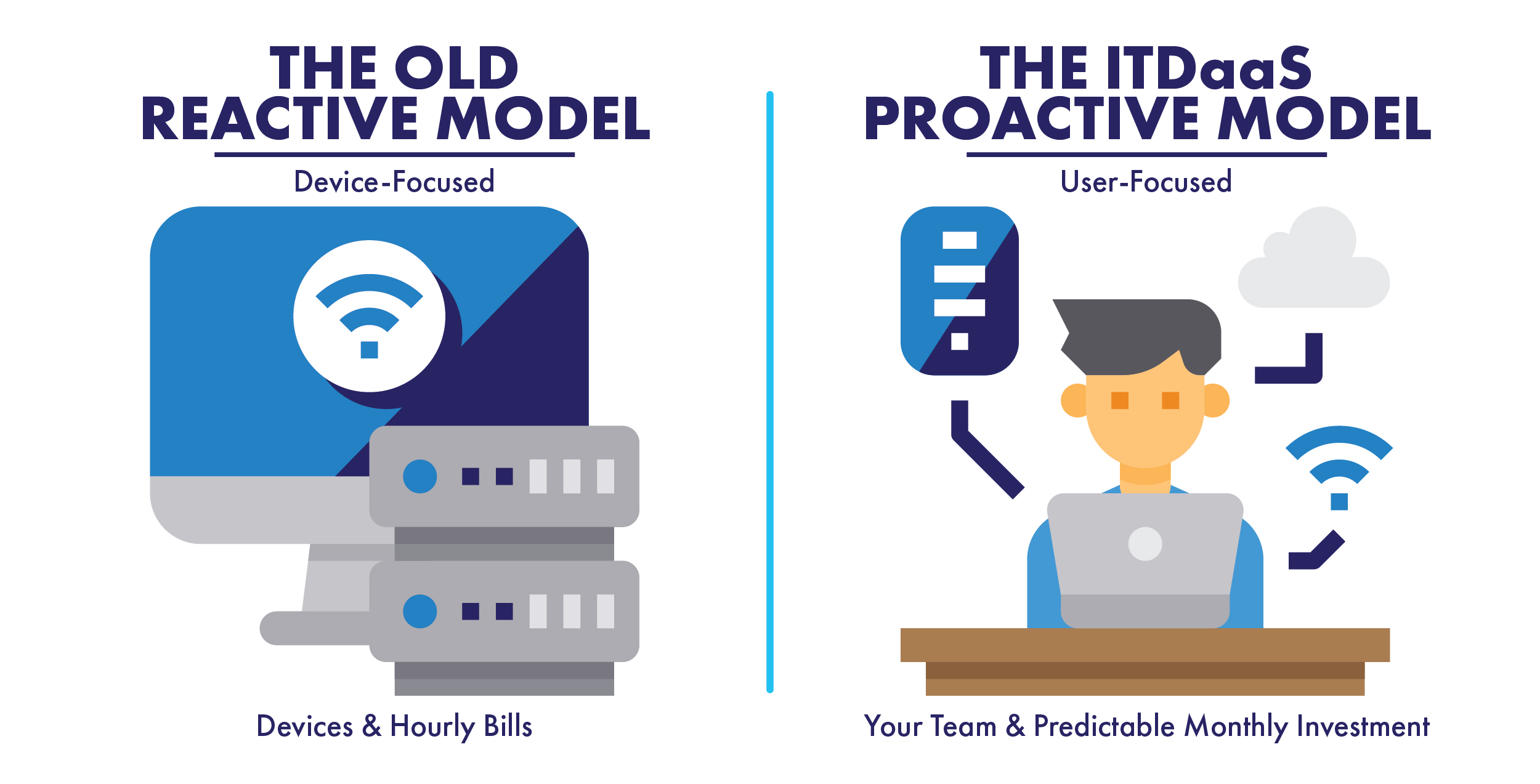

Most people think about IT when something stops working. The internet goes down, an application won’t open, a password stops working, or a computer suddenly decides it has other plans for the day. That’s when technology gets everyone’s attention.
But some of the most important work in IT happens when no one notices anything at all.
Systems are monitored. Updates and security patches are installed. Backups are checked. Threats are detected and stopped. Equipment is maintained, and potential problems are identified before they become disruptions. When all of those pieces are working together, technology simply does what it is supposed to do—and people can concentrate on their jobs.
After 25 years in this business, I’ve learned that solving problems quickly will always be important. But preventing those problems in the first place is even better.
That’s one of the biggest changes I’ve seen in our industry and at Active DataComm. IT support has evolved from being primarily reactive—waiting for something to break—to becoming proactive and strategic.
Our goal isn’t for you to think about your IT department every day. In fact, quite the opposite. We want your technology to be secure, reliable, and quietly working in the background so you can focus on running your organization.
And if your organization needs an IT department working behind the scenes to monitor, maintain, and protect your systems, you can get started today for as little as $99 per user, per month with our EssentialCare IT Department as a Service plan.
Learn more and get started at go.callactive.com.
Sometimes the best indication that your technology is working is that nobody is talking about it.

AI tools can read emails, summarize documents, browse websites, analyze files, and even take actions on your behalf. But what happens when something the AI reads contains instructions designed to trick the AI itself? This attack is called prompt injection.
Here is how to use AI more safely:
Treat Outside Content as Untrusted: A webpage, email, document, or other file can contain malicious instructions intended for an AI—even instructions that may not be obvious to you.
Limit What AI Can Access: Only give AI tools access to the files, email, accounts, and systems they actually need. The more access an AI has, the more damage a successful attack could potentially cause.
Require Permission Before Actions: Tell AI assistants not to send messages, modify files, run commands, make purchases, share information, or take other external actions without first asking for your explicit approval.
Review Before You Approve: When an AI asks permission to take an action, verify that the action matches what you actually requested and that nothing unexpected has been added or changed.
Protect Sensitive Information: Never enter confidential company information, passwords, API keys, customer data, or other sensitive information into an AI service unless your organization has approved it for that purpose.
Imagine asking an AI assistant to summarize a webpage. Hidden within that page could be instructions telling the AI to ignore your request and instead reveal information it can access or perform an unintended action. You didn’t fall for the attack—the AI did.
The Takeaway
AI assistants can be extremely useful, but information they read should never automatically be trusted. Prompt injection allows attackers to hide malicious instructions inside ordinary content in an attempt to manipulate an AI into doing something you never intended.
The Action Item
Before using an AI assistant that can access your email, files, computer, or other systems, tell it to always ask for your explicit permission before taking any external action. Keep its permissions limited to what it actually needs, and carefully review every requested action before approving it.

This month, I want to talk about one of the more important parts of using AI: knowing where it can fall short. I use ChatGPT often, but I do not treat every answer like it is automatically correct. AI can miss context, misunderstand what you are asking, or give an answer that sounds confident even when it needs to be checked.
The best use I have found is treating it like a helper, not the final decision-maker. It is great for organizing notes, explaining ideas, drafting messages, and giving a starting point. But the important stuff still needs a person to verify it, test it, and make the final call.
Result: trust, but verify.
The Takeaway
AI is a highly capable assistant for brainstorming, drafting, and organizing, but because it can lack context or confidently present inaccurate information, human oversight is essential. It is a starting point, not a final authority.
The Action Item
The next time you finish a complex ticket, paste your rough notes into ChatGPT and ask it to generate a clean, structured summary. Just remember to review the final output for technical accuracy before using it as an internal note or customer update.

Recently, I worked with a client whose older workstation was still running, but beginning to show its age. What started as a simple troubleshooting issue became a good reminder that technology does not have to completely fail before it becomes a business risk.
Older computers can become slower, harder to support, and more likely to experience unexpected issues. Planning ahead allows replacements and upgrades to happen on your schedule instead of during an emergency.
The Takeaway
Just because a device still works does not always mean it can still be depended on.
The Action Item
Take a look at the age of the computers and other technology your business relies on every day. If something is nearing the end of its useful life, now may be the right time to start planning for its replacement.
Typing isn’t always the fastest way to enter text. Windows includes a built-in voice typing feature that converts speech into text in most applications. Press [Windows Key] + [H] and begin speaking after the microphone panel appears. The tool automatically inserts punctuation and can be surprisingly accurate for emails, notes, and documentation. Even if you don’t use it regularly, it can be helpful when drafting longer messages or capturing ideas quickly.
The Takeaway
Voice typing can save time and reduce repetitive keyboard use for longer text entries.
The Action Item
Press [Windows Key] + [H] and dictate your next email draft instead of typing it.

Windows updates are far more than minor software tweaks—they serve as your computer’s primary defense system.
Every month, Microsoft releases background security patches (historically known as “Patch Tuesday”) to fix vulnerabilities that cybercriminals could otherwise use to install malware, steal personal data, or compromise your identity. Beyond security, these routine releases fix system bugs, improve battery life, and deliver new everyday features to keep your PC running smoothly.
To keep your personal computer secure without constant hassle, follow these four simple habits:
Keep Automatic Updates Enabled: Leave the default update settings on so Windows installs critical security patches in the background.
Set Your Active Hours: Adjust your “Active Hours” in Settings > Windows Update so your computer never restarts automatically while you are actively working or gaming.
Don’t Delay Restarts: When you see the small update icon in your taskbar, restart your PC within a day or two to apply pending security fixes.
Upgrade Old Operating Systems: Ensure you are running a supported version of Windows, as unpatched legacy systems no longer receive free security updates and remain vulnerable to emerging threats.
The Takeaway
Windows updates are not just minor annoyances; they are a critical defense system that patches security vulnerabilities, protects your personal data, and improves overall computer performance.
The Action Item
Go to your Windows Settings today to verify that Automatic Updates are enabled, set your “Active Hours” to prevent disruptive reboots while you work, and commit to restarting your computer promptly whenever you see an update notification.

Technology is moving quickly—from faster connectivity here at home to the opportunities and risks created by artificial intelligence. Staying informed is the first step toward staying prepared.
CYBERCRIME
- Americans reported nearly $20.9 billion in losses from internet crime in 2025—a 26% increase from the previous year. The FBI received more than 1 million complaints.
AI + CYBERCRIME
- The FBI received 22,364 complaints involving artificial intelligence in 2025, resulting in nearly $893 million in reported losses as criminals increasingly use AI-generated voices, images, profiles and video.
ARTIFICIAL INTELLIGENCE
- Between 17% and 20% of U.S. businesses reported using AI from December 2025 through May 2026, while as many as 23% expected to be using it within the following six months.
Local, Regional & Statewide
LOCAL — TUPELO, MS
- Fiber internet speeds of up to 8 gigabits per second are now available in parts of Tupelo—an example of how quickly our local technology infrastructure continues to advance.
LOCAL — NORTH MS
- More than 2,000 homes across eight Tate County communities are part of a recent fiber expansion bringing multi-gigabit internet farther across North Mississippi.
MISSISSIPPI — BROADBAND EXPANSION
- Mississippi's approved broadband expansion plan allocates $508 million to bring high-speed internet to 93,283 underserved residences across the state, supplemented by $321 million in private investment.